10 JUL 26


a while ago i made a manga shader for no apparent reason. i haven't used it in any project yet but here's a small explanation of how you can make it, tweak it and use it to make cool shit.
if you don't care about the explanation and just want the shader and "how to", here's a quick run down.
firstly, before you nose dive into this, note that this shader is an overlay shader. it's not a spatial shader that you add to each object.
now with that detail out of the way, go to the scene where you want the manga shader applied, and add a CanvasLayer and a ColorRect as its child.

before we proceed to the shader, tweak 2 properties:
1st. in your ColorRect, set the anchor preset to Full Rect so it covers the whole screen.

2nd. set your Mouse Filter to Ignore so the ColorRect won't obstruct your mouse inputs.

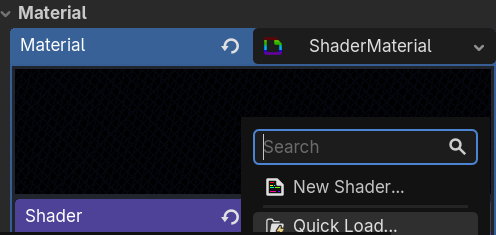
with that done, go ahead and give it a Shader Material and add a New Shader.
shader_type canvas_item;

uniform sampler2D screen_texture: hint_screen_texture, filter_linear_mipmap;

uniform int cel_bands : hint_range(2, 6) = 3;
uniform float hatch_scale : hint_range(1.0, 50.0) = 7.5;
uniform float hatch_threshold : hint_range(0.0, 1.0) = 0.8;
uniform float hatch_strength : hint_range(0.0, 1.0) = 1.0;
uniform float sketch_speed : hint_range(0.0, 30.0) = 12.0;
uniform float sketch_offset : hint_range(0.0, 3.0) = 0.6;
uniform vec4 outline_color : source_color = vec4(0.0, 0.0, 0.0, 1.0);
uniform float outline_thickness : hint_range(0.5, 6.0) = 0.9;
uniform float edge_threshold : hint_range(0.01, 0.5) = 0.08;
uniform float contrast : hint_range(0.5, 2.0) = 2.0;
uniform vec4 paper_tint : source_color = vec4(1.0, 1.0, 1.0, 1.0);

float luma(vec3 c){return dot(c, vec3(0.299, 0.587, 0.114));}
float hash(float n){return fract(sin(n) * 43758.5453);}

vec2 jitter(float time, float speed, float offset, vec2 ts){
    float f = floor(time * speed);
    return vec2(hash(f*1.7+0.3)-0.5, hash(f*2.3+1.1)-0.5) * 2.0 * (offset / ts);
}

float hatch(vec2 spx, float angle, float spacing, float thickness){
    float proj = spx.x * sin(angle) + spx.y * cos(angle);
    return step(mod(proj, spacing), thickness);
}

float sobel(vec2 uv, vec2 px){
    vec3 tl = texture(screen_texture, uv+px*vec2(-1,-1)).rgb;
    vec3 t = texture(screen_texture, uv+px*vec2( 0,-1)).rgb;
    vec3 tr = texture(screen_texture, uv+px*vec2( 1,-1)).rgb;
    vec3 l = texture(screen_texture, uv+px*vec2(-1, 0)).rgb;
    vec3 r = texture(screen_texture, uv+px*vec2( 1, 0)).rgb;
    vec3 bl = texture(screen_texture, uv+px*vec2(-1, 1)).rgb;
    vec3 b = texture(screen_texture, uv+px*vec2( 0, 1)).rgb;
    vec3 br = texture(screen_texture, uv+px*vec2( 1, 1)).rgb;
    vec3 gx = -tl-2.0*l-bl+tr+2.0*r+br;
    vec3 gy = -tl-2.0*t-tr+bl+2.0*b+br;
    return sqrt(dot(gx,gx)+dot(gy,gy));
}

void fragment(){
    vec2 tex_size = vec2(textureSize(screen_texture, 0));
    vec2 uv = SCREEN_UV;
    vec2 px = outline_thickness / tex_size;
    vec2 j = jitter(TIME, sketch_speed, sketch_offset, tex_size);
    vec2 juv = uv + j;
    vec2 spx = uv * tex_size;
    vec2 sjpx = juv * tex_size;
    float grey = luma(texture(screen_texture, uv).rgb);
    grey = clamp((grey - 0.5) * contrast + 0.5, 0.0, 1.0);
    float bright = grey;
    grey = floor(grey * float(cel_bands)) / float(cel_bands);
    vec3 color = vec3(grey) * paper_tint.rgb;
    float shadow_mask = step(bright, hatch_threshold);
    float deep_mask = step(bright, hatch_threshold * 0.6);
    float deepest_mask = step(bright, hatch_threshold * 0.3);
    float h1 = hatch(sjpx,  0.7854, hatch_scale, 1.5);
    float h2 = hatch(sjpx, -0.7854, hatch_scale, 1.5);
    float h3 = hatch(sjpx,  1.3090, hatch_scale, 1.5);
    float hatching = h1;
    hatching = mix(hatching, max(h1, h2), deep_mask);
    hatching = mix(hatching, max(max(h1,h2), h3), deepest_mask);
    color = mix(color, outline_color.rgb, hatching * shadow_mask * hatch_strength);
    float edge = step(edge_threshold, sobel(juv, px));
    color = mix(color, outline_color.rgb, edge);
    COLOR = vec4(color, 1.0);
}
go ahead and paste this code and that should be it. just make sure you have lighting in your scene. i've set the values to what i used in my example, feel free to tweak around.
in a day or so I will post an explanation blog for this it was getting pretty big so I just made it a seperate blog
also if you face any issues feel free to contact me, m open to doubts and opinions